Open Source · MIT License

Proxy rules,
visually routed.

Bringing Nginx-level routing to your desktop. Intercept, inspect, and rewrite HTTP/HTTPS/WebSocket traffic from any client — browser, Postman, WeChat DevTools, or scripts. ~10MB Tauri 2 native app.
Windows · macOS · Linux · v0.1.1
RouteMan
RouteMan visual rule editor
100% Local
~10 MB
No Cloud · No Telemetry
Open Source · MIT

Up and running
in 3 steps

01

Install

Download ~10MB. Trust the CA certificate with one click.

02

Define Rules

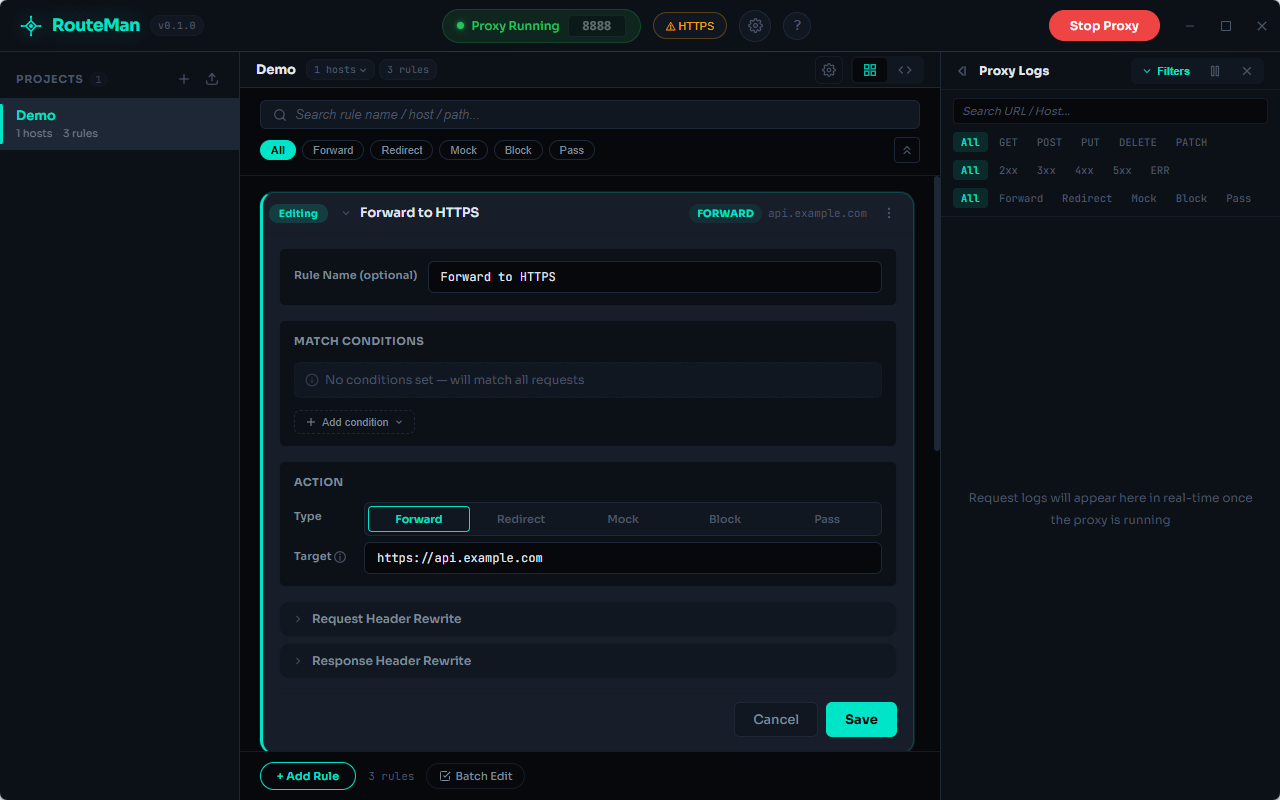
Visual drag-and-drop or YAML — match domains, paths, headers, and set actions.

03

Start Debugging

System proxy activates instantly. All client traffic is captured and routed by your rules.

Everything you need to
debug traffic

HTTP/HTTPS/WebSocket Proxy

Full MITM decryption for HTTPS via self-signed CA. Native WebSocket tunnel support with handshake-phase header modification.

Multi-Project Isolation

Organize rules by project. Each project listens to specific hosts with independent configuration. No more workspace switching.

Dual Mode Config

Visual drag-and-drop builder or Monaco YAML editor — switch anytime.

Rich Matching

Domain wildcard, path pattern, HTTP method, headers, query params, and cookies.

5 Rule Actions

Forward, Redirect, Mock (inline/file), Block, and Pass-through.

Header Rewrite

Add, override, or remove request/response headers on matched rules.

Real-time Logs

Live request panel with filtering by method, status, protocol. Click to inspect full detail.

System Proxy Automation

Auto-sets and restores system proxy. No manual OS configuration needed.

See it
in action

Three-panel layout: project sidebar, rule configuration, and real-time proxy log.

RouteMan
RouteMan main interface

Built for
real workflows

01

Cross-Origin Debugging

Bypass CORS restrictions and debug cross-origin API calls from your local dev server to remote backends without modifying browser settings.

Before Access to 'http://api.server' blocked by CORS RouteMan Add header rule: Access-Control-Allow-Origin: *
02

API Mocking

Return mock responses (inline JSON or local files) for endpoints that aren't ready yet. Develop frontend independently of backend progress.

RouteMan Rule /api/products → Mock
{ "items": [...], "total": 10 }
03

Multi-Environment Testing

Switch between dev, staging, and production backends with a single rule change. Redirect requests to different targets instantly.

04

WebSocket Debugging

Intercept, forward, or block WebSocket connections. Inspect handshake headers and modify them in transit.

05

Multi-Backend Routing

Route /api/user to developer A, /api/order to developer B. Path-level traffic distribution for microservices and team collaboration.

/api/user/* 192.168.1.10:8080
/api/order/* 192.168.1.20:9090
06

Request Inspection

View complete request/response headers and payloads in real-time. Identify unexpected headers, tokens, or data leaks.

07

System-Level Proxy

Works beyond the browser — captures traffic from Postman, WeChat DevTools, curl, Node.js scripts. One config, every client.

One Config, All Clients Browser ✓ Postman ✓ WeChat ✓ curl ✓

Why RouteMan
over alternatives

RouteMan Charles / Fiddler Other Tools
Install Size ~10 MB 50–200 MB 30–150 MB
Startup Time Instant Seconds Seconds
Configuration Visual + YAML GUI Forms GUI Forms
Project Isolation Built-in Manual Manual
Data Privacy 100% Local, No Cloud Some require account Varies
WebSocket Native Limited Limited
Price Free & OSS (MIT) Commercial Varies

Comprehensive
documentation

Everything you need to get started, configure, and master RouteMan.

Frequently
asked questions

Do I need to install a certificate?
Yes. RouteMan uses a self-signed CA certificate to decrypt HTTPS traffic. You only need to trust it once — RouteMan provides a one-click install experience.
Will it affect my normal internet usage?
No. RouteMan automatically sets the system proxy when active and restores it when you stop. Close RouteMan and everything goes back to normal instantly.
How is it different from SwitchyOmega or other browser extensions?
RouteMan works at the system level — it captures traffic from all applications (Postman, WeChat DevTools, curl, Node.js scripts), not just the browser.
Can I share or back up rule configurations?
Yes. Rules are stored as YAML files that can be checked into Git, shared with teammates, or backed up anywhere.
Which protocols are supported?
HTTP, HTTPS (via MITM), and WebSocket — covering virtually all web development traffic scenarios.
Is it completely free?
Yes. RouteMan is 100% open source under the MIT license. Free forever, no account required, no usage limits.

Start routing traffic

Download RouteMan — free, open source, no account required.